![[logo] ShipNerd - Ship smarter!](https://www.shipnerd.com/support/wp-content/uploads/2024/02/logo_4x.svg)
Support Home > Import & Export Shipping >
Section 232: What is a S232 shipment?
Section 232 is a U.S. Customs data requirement when you’re importing certain steel or aluminum products into the United States. It’s part of the U.S. Department of Commerce’s Section 232 regulations, which impose additional reporting requirements to verify where metal materials were made and processed — specifically the country of melt and pour (for steel) or smelt and cast (for aluminum).
ShipNerd now supports Section 232 data entry directly during shipment creation for applicable steel and aluminum products. This allows you to provide required trade compliance information within ShipNerd instead of managing separate documentation outside the platform.
What’s New?
When shipping products that are subject to U.S. Section 232 trade requirements, you’ll now see a Section 232 Information section during the shipment creation process — when inputting the full 10 digit HS code of the commodity you’re shipping.
This feature is designed to help shippers provide the additional customs information often required for products containing steel or aluminum.
How It Works
During shipment creation, ShipNerd may request additional commodity details based on the HS code entered for your product.
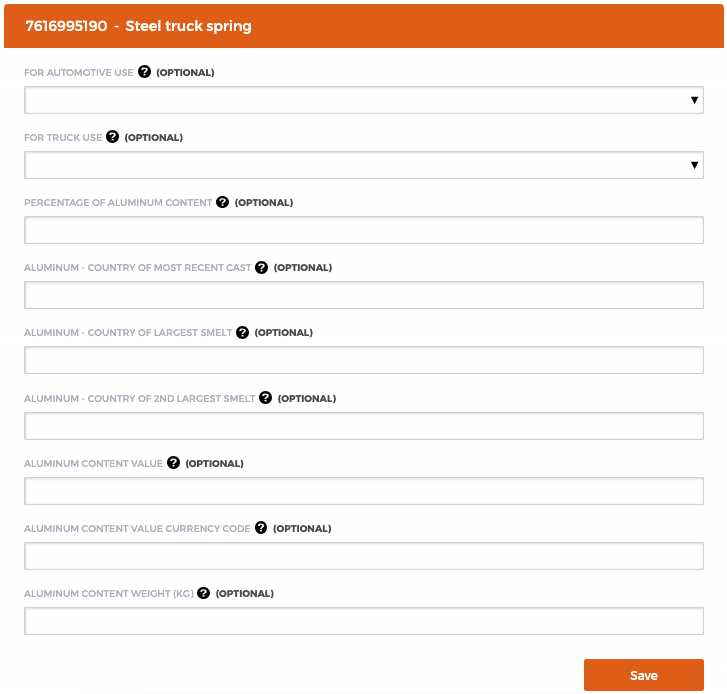
The Section 232 form can include fields such as:
- Automotive Use
- Truck Use
- Percentage of Aluminum Content
- Country of Most Recent Cast
- Country of Largest Smelt
- Country of 2nd Largest Smelt
- Aluminum Content Value
- Aluminum Content Currency Code
- Aluminum Content Weight (KG)
Once completed, the information is submitted as part of your shipment’s export and customs documentation workflow.
Why Accurate Information Matters
Providing accurate Section 232 information is critical to help ensure your shipment clears customs smoothly and avoids delays or compliance issues.
Incomplete or incorrect information may result in:
- Customs clearance delays
- Additional customs reviews or inspections
- Requests for supporting documentation
- Shipment holds or returns
- Incorrect duties or tariffs being applied
To help prevent disruptions, ensure all material composition and country-of-origin information is entered accurately before submitting the shipment.
Example
In the screenshot below, Section 232 information is being entered for a shipment containing a Steel truck spring.
The system requests additional steel and aluminum-related details based on the commodity’s HS code.
Benefits
Using the integrated Section 232 workflow helps you:
- Avoid managing separate compliance forms
- Submit required customs information in one place
- Improve shipment processing efficiency
- Reduce the risk of customs delays related to steel and aluminum imports
Important Notes
- ShipNerd does not validate Section 232 trade data entered by the shipper.
- Section 232 requirements vary depending on the product classification and destination/import country requirements.
- Using a detailed customs description (for example, “steel coil springs for cars” instead of simply “steel springs”) can help reduce the risk of HS code reclassification. Broad or generic descriptions may lead CBP to apply a more conservative tariff classification to prevent potential underpayment of duties or tariffs.
- Some fields may be optional depending on the commodity and shipment details.
- Shippers are responsible for ensuring the accuracy of all material and sourcing information provided.